

For many years, Ktlint handled both formatting and linting in Square's large Android monorepo. Over time, however, frustrations with certain design decisions and limitations grew and prompted us to explore alternatives. We ultimately migrated the entire codebase to Ktfmt for formatting and Detekt for linting.
Formatting vs Linting
Code formatting and linting serve two different purposes. Formatters enforce style and structure of code without changing semantics while linters detect potential bugs, errors and violations of best practices. A good formatter is fast, fully automatable, deterministic and consistent. A good linter is configurable, accurate and provides clear, actionable diagnostics.
Ktlint wants to solve both problems at the same time, but misses some of our requirements. Developers frequently had to manually adjust code in order to meet Ktlint's expected code style, e.g. Ktlint couldn't automatically wrap too long lines or remove unused imports.
shell1/path/SomeFile.kt:120:108: Exceeded max line length (100) (cannot be auto-corrected) (standard:max-line-length)
Even with a shared .editorconfig file, the applied code style in the IDE often wasn't consistent
with what Ktlint enforced through CLI and Gradle tasks. Developers had to run checks manually
in the terminal and then explicitly not reformat in the IDE again, e.g. the IDE would format
super types in this way:
kotlin1interface SomeType : Super1,
2  Super2,
3  Super3,
4  ...
Whereas Ktlint expected a new line after the colon:
kotlin1interface SomeType :
2  Super1,
3  Super2,
4  Super3,
5  ...
6
We discovered more inconsistencies with Ktlint. For example, the line length isn’t correctly enforced when it comes to code comments:
kotlin1/**
2 * This is a very long line exceeding the limit ...
3 */
4// This is a very long line exceeding the limit ...
5@Parcelize
6data class ProductSet(
7  val id: String = "", // This is a very long line exceeding the limit ...
8) : Parcelable
All three lines with a comment exceed the line length, yet Ktlint only complains about the third after the code snippet. The issue is not auto-fixable either.
Ktlint evolved over the years and we didn't like some of their design decisions. As a result, we often opted for disabling rules, which brought more challenges such as sharing configurations with other repositories. Ktlint was no longer an anti-bikeshedding solution.
fun format(ktlint: Ktlint): Ktfmt
We adopted Ktfmt as code formatter to enforce a consistent code style. Ktfmt solved our challenges and met all of the requirements we needed from a good formatter. It's fast, deterministic, can auto-fix all reported issues, and with its IDE and Gradle plugins the code style is consistent across all tools we use. We decided to use the Google style, because it matched our existing code style best.
During the migration we encountered issues related to the size of our codebase, e.g. when formatting the whole codebase we ran into glob expansion limits:
shell1> ktfmt **/*.kt --google-style
2
3zsh: argument list too long: ktfmt
To avoid this issue we wrapped Ktfmt in a shell script that chunks the input files.
Speed wasn’t the primary motivation to move to Ktfmt, but it was a nice surprise to see how much faster it is compared to Ktlint. When comparing them head to head against 3,500 Kotlin files, Ktfmt ran in 5.9 seconds, while Ktlint took 14.8 seconds. That’s an improvement of almost 40%! We saw similar results with our Gradle integration, where we measured an improvement of 37% when formatting our entire codebase of more than 60,000 Kotlin files. Skipping Gradle in the process through our script gave us another significant improvement.
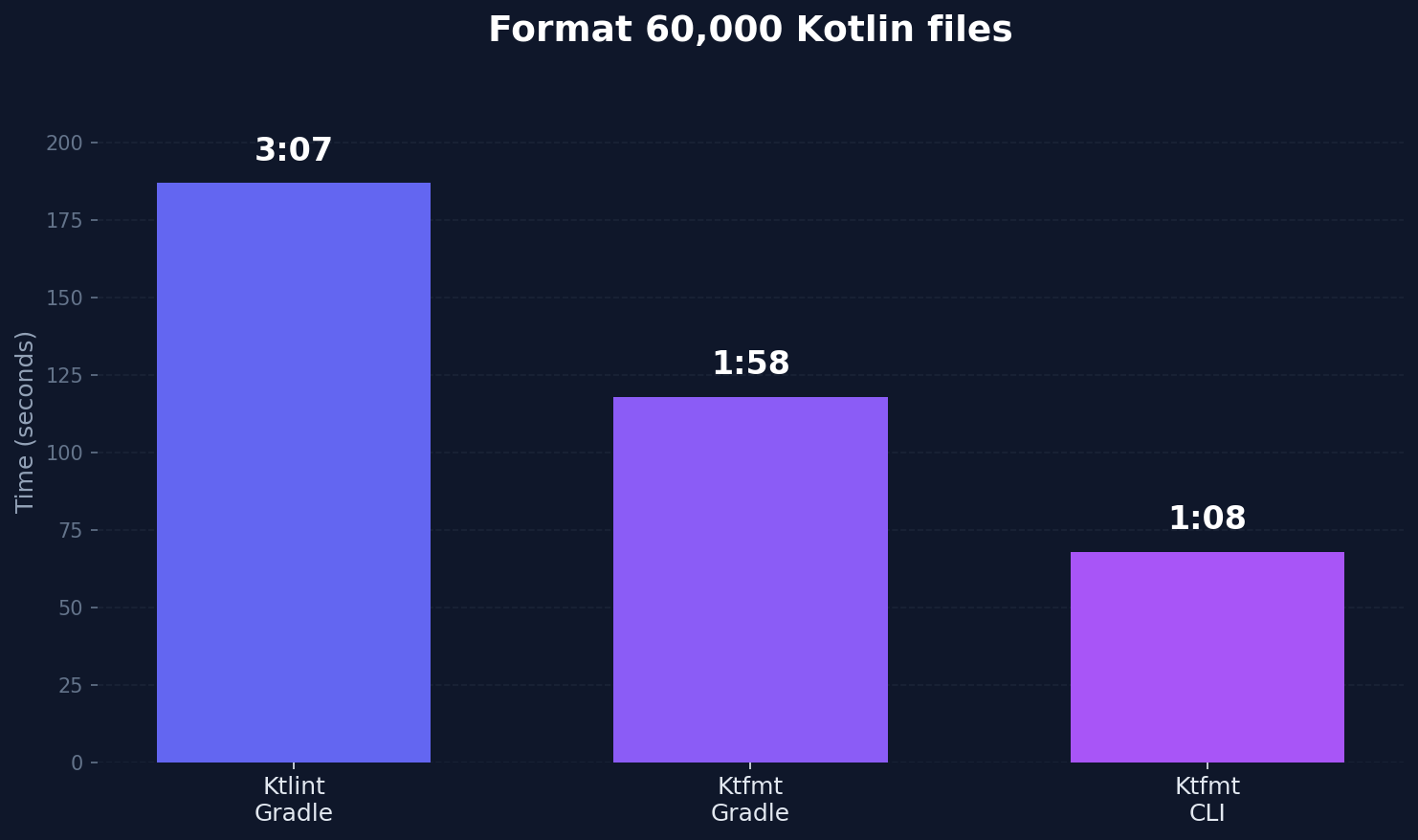
While Ktfmt is fast, formatting more than 60,000 Kotlin files still takes a significant amount
of time. To speed up formatting for developers, we extended our shell script with a feature to
only look at files that have changed locally compared to a Git base branch like main. This
formatting step takes a few milliseconds and runs part of our pre-commit Git hook. Developers
don't need to format code manually anymore as this happens automatically when files are committed.
Ktfmt's enforced code style was a significant change for certain code constructs. Some developers disagreed with some rules, but the benefits of the tool as a whole, such as being able to auto-fix all violations, outweighed style concerns. In the end we consider not having the option to disable certain rules to be a benefit.
Besides the challenges due to the size of our codebase, rolling out Ktfmt was straightforward and the tool worked well out of the box.
fun lint(ktlint: Ktlint): Detekt
We extended Ktlint with many custom lint rules specific to our codebase, which we couldn't simply drop. Alongside Ktlint, we were already using Detekt for some of its built-in static code analysis checks. The reasonable next step for us was migrating our custom rules from Ktlint to Detekt.
Fortunately, this migration was easier than expected. Both Ktlint and Detekt analyze code using PSI. Their APIs for extensions were so similar that a big part of the migration could be driven by AI tools.
Before with Ktlint:
kotlin1class NoComposeViewRule : Rule(...), RuleAutocorrectApproveHandler {
2    override fun beforeVisitChildNodes(
3        node: ASTNode,
4        emit: (offset: Int, errorMessage: String, canBeAutoCorrected: Boolean) -> AutocorrectDecision,
5    ) {
6        if (node.elementType == REFERENCE_EXPRESSION && node.parent(TYPE_REFERENCE) != null) {
7            val methodReference = node.psi as KtReferenceExpression
8            if (methodReference.textMatches("ComposeView")) {
9                emit(
10                    node.startOffset,
11                    "Explicit usage of `ComposeView` is discouraged. " +
12                            "Consider using `WorkflowViewStub` instead.",
13                    false
14                )
15            }
16        }
17    }
18}
After with Detekt:
kotlin1class NoComposeView(config: Config = Config.empty) : Rule(config) {
2  override val issue = Issue(...)
3
4  override fun visitTypeReference(typeReference: KtTypeReference) {
5    super.visitTypeReference(typeReference)
6
7    val typeText = typeReference.text
8    if (typeText == "ComposeView") {
9      report(
10        CodeSmell(
11          issue = issue,
12          entity = Entity.from(typeReference),
13          message = "Explicit usage of `ComposeView` is discouraged. " +
14            "Consider using `WorkflowViewStub` instead.",
15        )
16      )
17    }
18  }
19}
We built a facade for unit tests for Detekt rules that mimicked Ktlint's testing API. This allowed us to copy unit tests without changes and verify that rules were migrated correctly to Detekt. Our test coverage gave us a lot of confidence.
Detekt came with other benefits that we enjoy a lot. There is a rich ecosystem of custom rules that we started using, e.g. rules specific to Jetpack Compose. Detekt's baseline feature helps a lot to roll out new rules and checks, specifically baseline suppressions don't start to fail when the position in the code changes.
Conclusion
After one month and 106 pull requests, we successfully migrated to Ktfmt and Detekt, completely removing Ktlint from the codebase. Several other large repositories at Block have since followed suit, and the resulting consistency across the company has been a clear win.
One developer's feedback captured the impact best:
I know people have been bikeshedding about this, but I just want to say it's been amazing for my productivity. I can now commit without ever thinking about formatting again!